
Accessing uiuLearn
Logging in is easy! Just follow the steps below to access UIU's online learning management system, uiuLearn.
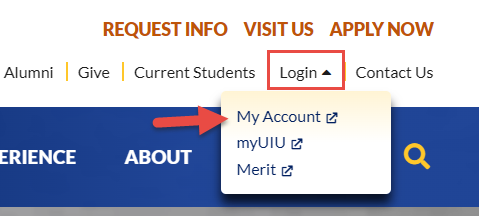
- Navigate to https://uiu.edu/
- Select the Login with the dropdown arrow.
- Select My Account.
- You will be redirected to Microsoft MyApps login page.
- Enter your UIU email address and password, then sign in.
- Once you are on the MyApps dashboard, select uiuLearn.
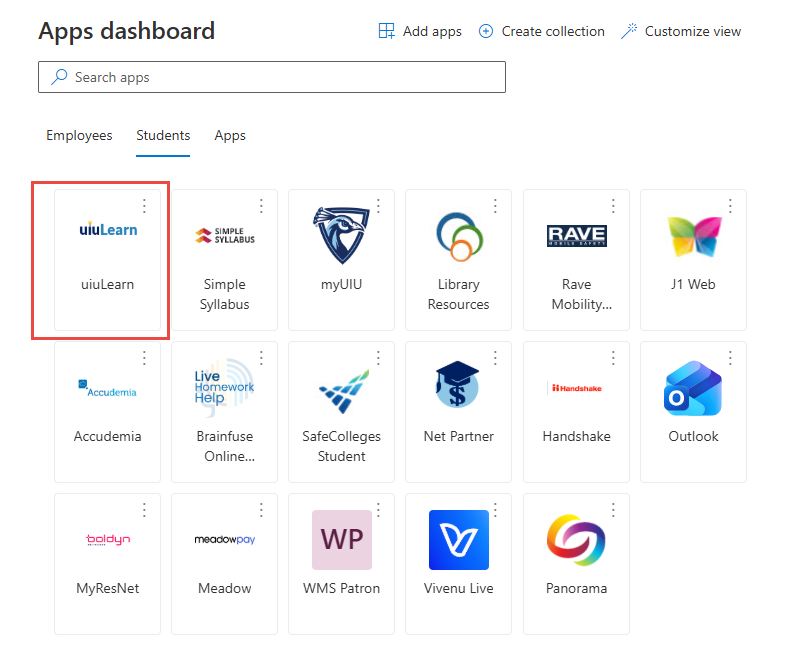
- You will be redirected to the Brightspace website, where you can view your courses, assignments, grades, and course materials.
Need Help?
If you are unable to sign in:
- Verify that you are using your correct UIU email address and password.
- Try clearing your browser's cache and cookies or using a different browser.
- If you have forgotten your password, reset it using the password recovery process.
- Contact the IT Helpdesk if you continue to experience issues accessing uiuLearn.